Catch the bug as many times as you can before time runs out.
Game Rules / Behavior
The “bug” is shown as a bright LED point somewhere on the 5×5 LED grid.
The “player cursor” is a dimmer LED that the player moves using the buttons:
Button A moves left.
Button B moves right.
Button A + B together moves down.
Wraparound movement:
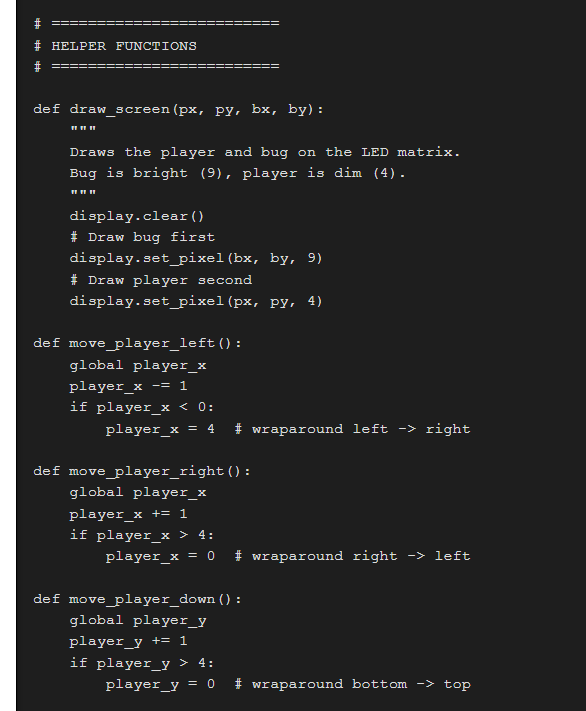
If you move left from column 0, you appear at column 4.
If you move right from column 4, you appear at column 0.
If you move down from row 4, you go back to row 0.
If the player’s position matches the bug’s position, the player scores a point:
Score increases by 1.
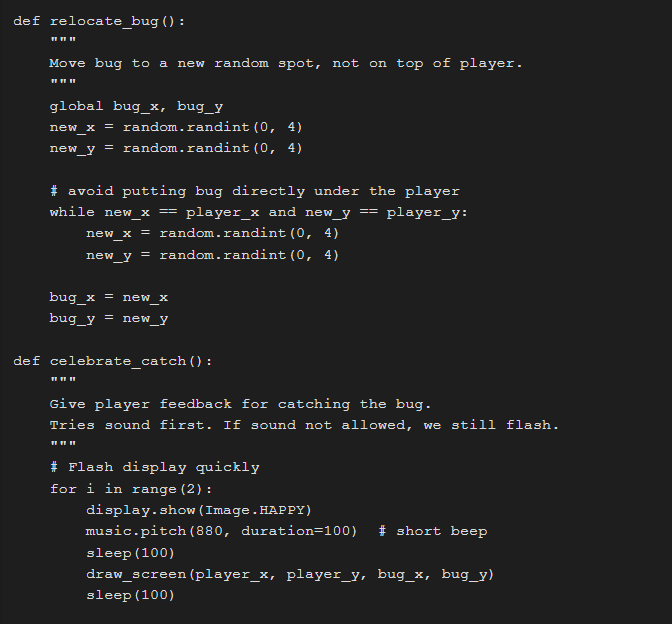
Play a short sound or flash LEDs.
The bug jumps to a new random location.
The game lasts for a fixed amount of time (example: 20 seconds).
When time is up:
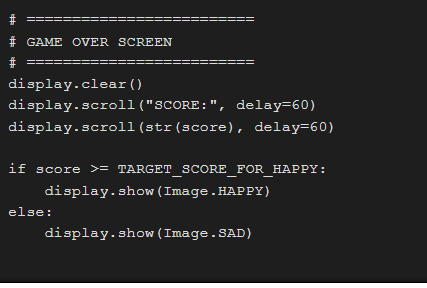
Scroll the final score using display.scroll().
Show a happy face if score ≥ 5, otherwise a sad face.
Variables You Must Use
player_x, player_y: the player cursor location.
bug_x, bug_y: the bug location.
score: how many times you caught the bug.
start_time: when the game started (in ms).
GAME_LENGTH: how long the game lasts (in ms).
Grading / Expectations for Full Credit
The game runs on a micro:bit using MicroPython.
You can move the player with A, B, and A+B (down).
The game correctly detects when you catch the bug and adds to your score.
The bug relocates after each catch.
The timer ends the game and the score displays.
BONUS / EXTENSION IDEAS
Add vertical movement (for example: shake to move up).
Make the bug move randomly every second to make it harder.
Keep a high score between rounds (without powering off).
2. Pseudo Code (Game Logic Plan)
This is the logic in plain English. You should understand this before you code.
SETUP
Import micro:bit and random.
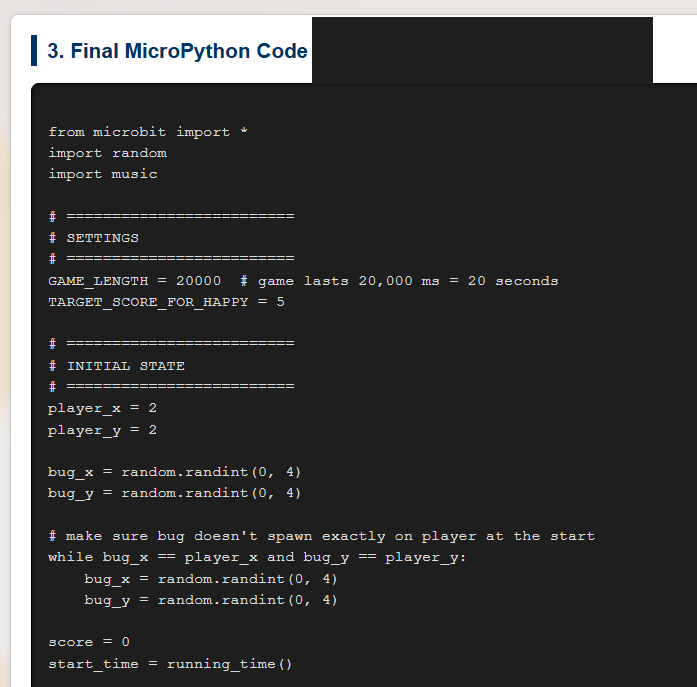
Set player_x = 2, player_y = 2 (start in middle).
Choose a random bug position:
bug_x = random 0..4
bug_y = random 0..4
If bug is on the player, pick again.
Set score = 0.
Set GAME_LENGTH = 20000 ms (20 seconds).
start_time = running_time() to mark the start.
MAIN LOOP (repeat while time not up)
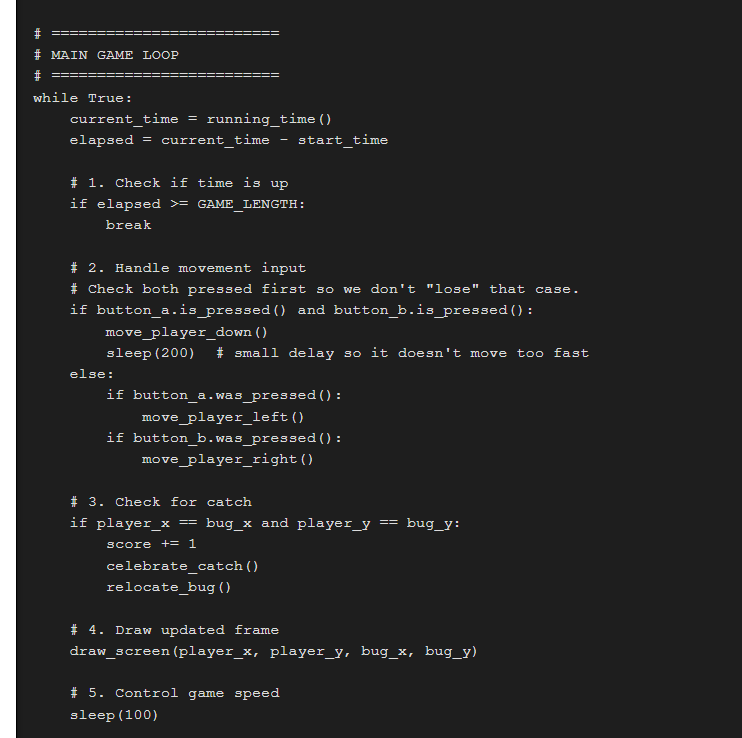
Check current time:
If time since start is greater than GAME_LENGTH, end the game.
Read player input:
If A is pressed → move left (wrap at edge).
If B is pressed → move right (wrap at edge).
If A and B are both pressed → move down (wrap at bottom).
Check collision:
If player_x == bug_x AND player_y == bug_y:
Increase score by 1.
Celebrate (sound / flash).
Move bug to a new random spot not equal to player.
Draw the screen:
Clear display.
Draw bug as bright pixel.
Draw player as dimmer pixel.
Sleep a short time so the loop doesn't run too fast.
END GAME:
- Clear the display.
- Scroll "SCORE:" and then the actual number.
- If score ≥ 5, show a happy face. Otherwise show a sad face.
- Stop.
3. Final MicroPython Code (Code to micro:bit)
The name of the file will be: PX_lastname_Bug
Files to save on Google Drive under your class and submit to Google Classroom
PX_lastname_Bug.png — Screenshot inside Python editor showing your code.
PX_lastname_Bug.py — Your Python source file.
PX_lastname_Bug.txt — Plain-text copy of your code.
PX_lastname_Bug.hex — Hex file to run on the physical micro:bit.
PX_lastname_Bug.mp4 — Short demo video of the program running on the board.
Submission requirements
Show the real micro:bit hardware running your animation to Mr. Cusack.
Get the secret code word after you demo.
Include that exact code word in your Google Classroom submission comments.
Teacher / Student Reflection:
- Where in the code do we track time?
- Where in the code do we wrap around the edges?
- What part would you change to make the game harder?
- Can you add vertical movement (shake to move up)?